

Essential Strategies for Secure File Uploads Access and Sharing in the Digital Age
- MLJ CONSULTANCY LLC

- May 31
- 3 min read
In today’s digital world, sharing and storing files online is a daily routine for many businesses and individuals. However, this convenience comes with risks. Without proper security, sensitive information can be exposed, leading to data breaches, financial loss, or damage to reputation. Secure file uploads, access, and sharing are critical to protect data and maintain trust.
This post explores why secure file handling matters, best practices to keep data safe during uploads, different ways to control access and sharing, and tools that help improve security. We will also share practical tips for users to protect sensitive information when sharing files.

Secure file upload interface showing progress and security features
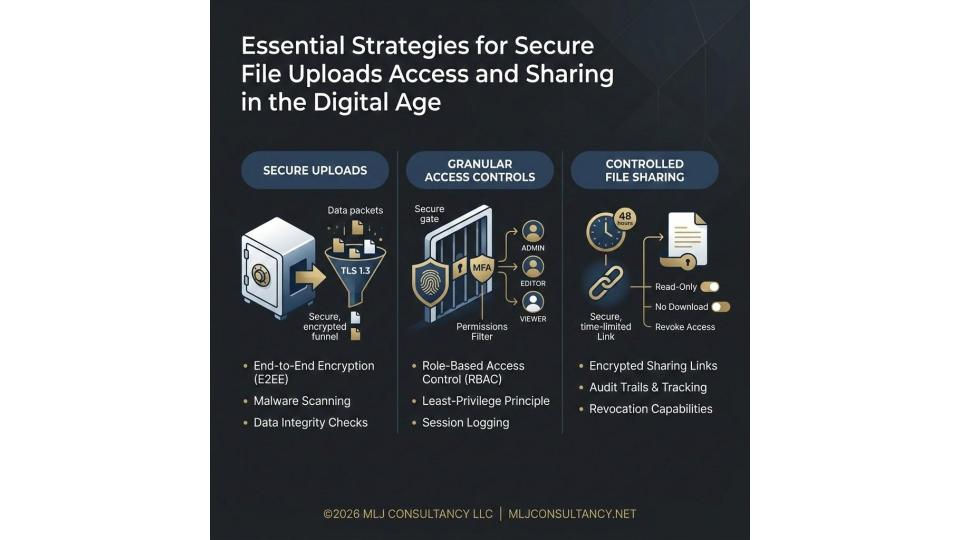
Why Secure File Uploads Matter
File uploads are a common way to transfer data, but they can be a weak point if not handled carefully. Attackers often exploit file upload features to inject malware, steal data, or gain unauthorized access. For example, uploading a file with hidden malicious code can compromise a system.
Sensitive files like contracts, business agreements, or personal information require extra protection. In industries like healthcare or finance, regulations such as HIPAA or GDPR demand strict security measures for file handling.
Secure file uploads help prevent:
Data leaks and unauthorized access
Malware infections and ransomware attacks
Compliance violations and legal penalties
By securing file uploads, organizations protect their data, customers, and reputation.
Best Practices for Secure File Uploads
To keep file uploads safe, follow these key practices:
1. Validate File Types and Sizes
Only allow specific file types that are necessary. For example, if you only need PDFs or images, block executable files or scripts. Also, limit the file size to prevent denial-of-service attacks.
2. Scan Files for Malware
Use antivirus or malware scanning tools to check uploaded files before storing or sharing them. This helps catch threats early.
3. Use Secure Protocols
Ensure file uploads happen over encrypted connections like HTTPS. This protects data from interception during transfer.
4. Store Files Securely
Keep uploaded files in secure storage with encryption at rest. Avoid storing files in publicly accessible locations.
5. Implement Strong Authentication
Require users to log in before uploading files. Use multi-factor authentication for added security.
6. Monitor and Log Upload Activity
Track who uploads what and when. Logs help detect suspicious activity and support audits.
Access Controls and Sharing Options
Controlling who can access and share files is as important as securing uploads. Different access controls help manage permissions effectively.
Role-Based Access Control (RBAC)
Assign roles like admin, editor, or viewer with specific permissions. For example, only admins can delete files, while viewers can only download.
Time-Limited Access
Share files with links that expire after a set time. This limits exposure if links are shared beyond intended recipients.
Password Protection
Add passwords to shared files or links. Recipients must enter the password to access the content.
Granular Permissions
Allow users to set permissions at the file or folder level. This helps control who can view, edit, or share files.
Audit Trails
Keep records of file access and sharing. This helps track usage and identify unauthorized actions.
Tools and Technologies to Enhance Security
Several tools and services help improve secure file uploads, access, and sharing. For example, MLJ Consultancy offers a service called Secure File Uploads, Access, and Sharing that provides customization, controlled access, and hands-on training for managing important files like policies, contracts, and HIPAA assessments.
Other useful technologies include:
Encryption tools to protect files during storage and transfer
Cloud storage platforms with built-in security features
Access management software to control user permissions
Malware scanning services integrated with upload systems
Using these tools helps build a secure environment for file handling.
Tips for Protecting Sensitive Information When Sharing Files
Users play a key role in keeping files safe. Here are some practical tips:
Verify recipients before sharing sensitive files
Use secure sharing platforms rather than email attachments
Avoid public Wi-Fi when uploading or accessing sensitive files
Regularly update passwords and use strong, unique ones
Educate team members on security best practices and risks
For organizations, training like the Revenue Cycle Management Trainings can help staff understand secure processes and reduce human error.
Integrating Secure File Handling with Business Processes
Secure file management is not just about technology. It should align with business workflows. For example, MLJ Consultancy’s Revenue Cycle Management Consulting service helps organizations improve their processes, which can include secure document handling as part of compliance and operational efficiency.
By combining consulting, training, and secure file services, businesses can build a strong foundation for protecting their data and meeting regulatory requirements.


Comments